

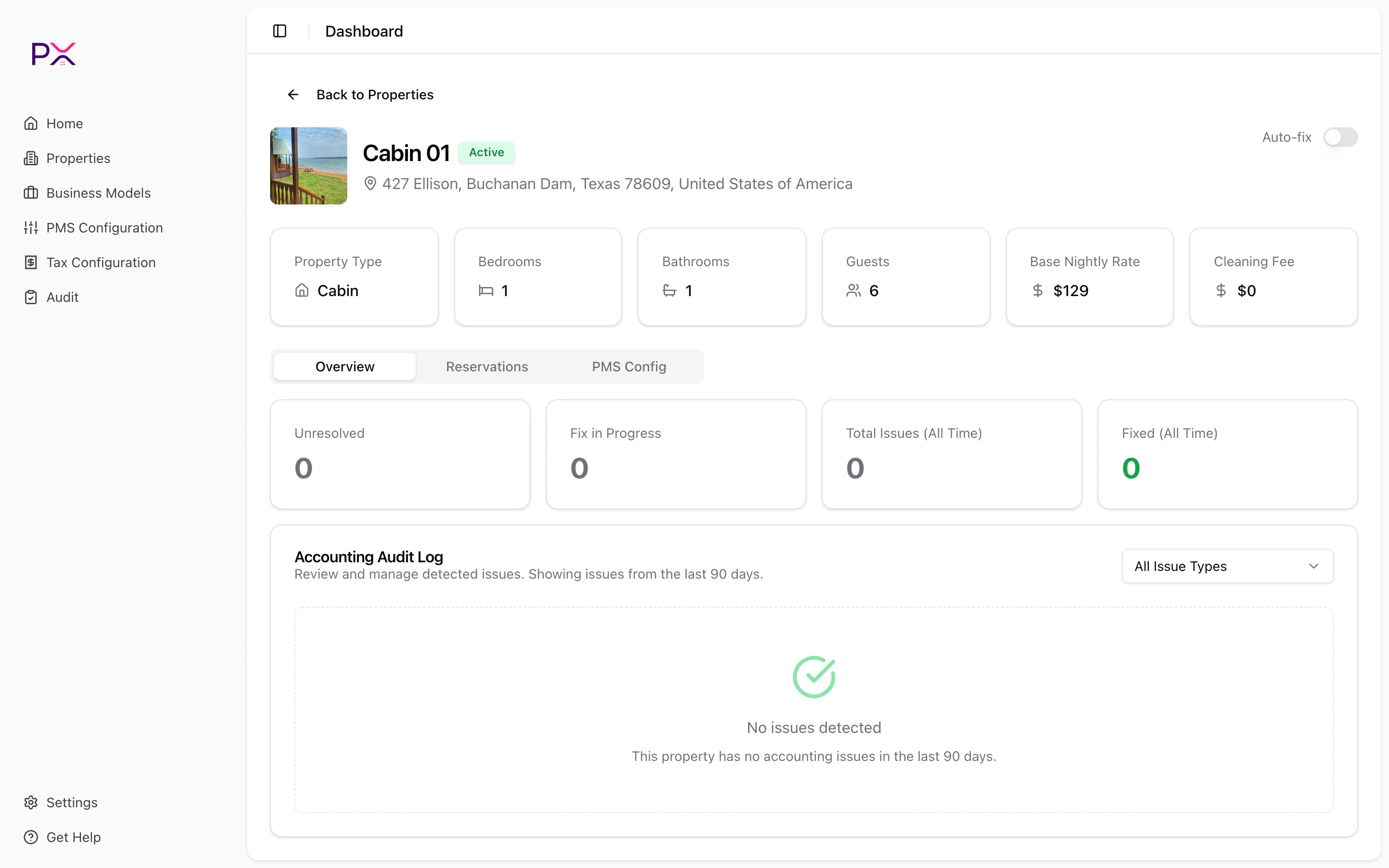
Property detail - Overview tab
Header
The top of the page shows:- A back button to the Properties list.
- The property thumbnail, name, status badge, and business model badge.
- The full address.
- The per-property Auto-Fix toggle.
Overview tab
The Overview tab is the primary view for issue management. KPI cards:- Unresolved - findings not yet acted on.
- Fix in Progress - auto-fix is processing these.
- Total Issues (All Time).
- Fixed (All Time).
- All Issue Types (default)
- Missing Payment
- Overcharge
- Records Don’t Balance
- Deposit Not Cleared
- Wrong Entry Date
- Deposit Mismatch
- Missing Deposit Records
- Severity badge (error / warning / info).
- Status badge (unresolved / in progress / fixed / dismissed).
- Issue type label.
- One-line description.
- Detected date and (if applicable) fixed date.
- Auto-fix off + unresolved - Start Fix and Dismiss buttons appear.
- Auto-fix on + unresolved - Fix in Progress badge replaces the buttons.
- Fixed or dismissed - icon only.
- “Auto-fix is enabled. Issues will be processed automatically.”
- “Review and manage detected issues. Showing issues from the last 90 days.”
Reservations tab
Browse this property’s reservations and click any row to open the accounting folio. Filters (three dropdowns):- Look-back range: Last 30 days / Last 90 days / Last 180 days.
- Look-forward range: Next 0 days / Next 30 days / Next 90 days.
- Status: All / Confirmed / Reserved / Checked-In / Checked-Out / Canceled / Pending / Inquiry.
- Confirmation code (monospace).
- Status badge.
- Paid badge if fully paid.
- Balance Due badge if a balance remains.
- Guest name, dates, nights, channel, business model.
- Host payout (primary number).
- Gross total (shown if it differs from host payout).
- On Guesty - journal entries from Guesty’s accounting engine.
- On OwnerRez - charges + payments + refunds + deposits assembled into a folio.
PMS Config tab
Read-only view of how this listing is configured in your PMS. On OwnerRez:- The OwnerRez Catalog renders, filtered to entries scoped to this listing.
- You can confirm or edit catalog rows here without leaving the property.
- A Refresh button at the top.
- Three lazy-loaded sections:
- Account Fees - account-level fees that may apply to this listing.
- Account Taxes - account-level tax rules.
- Channel Commissions - per-channel commission rules from your Guesty config.
- Help text: “Read-only fees, taxes, and channel commissions configured in your PMS for this listing.”
What’s next
Auto-fix
Per-property and global behavior.
Run an audit on one property
Use the listing filter on the Audits page to scope to this property.