

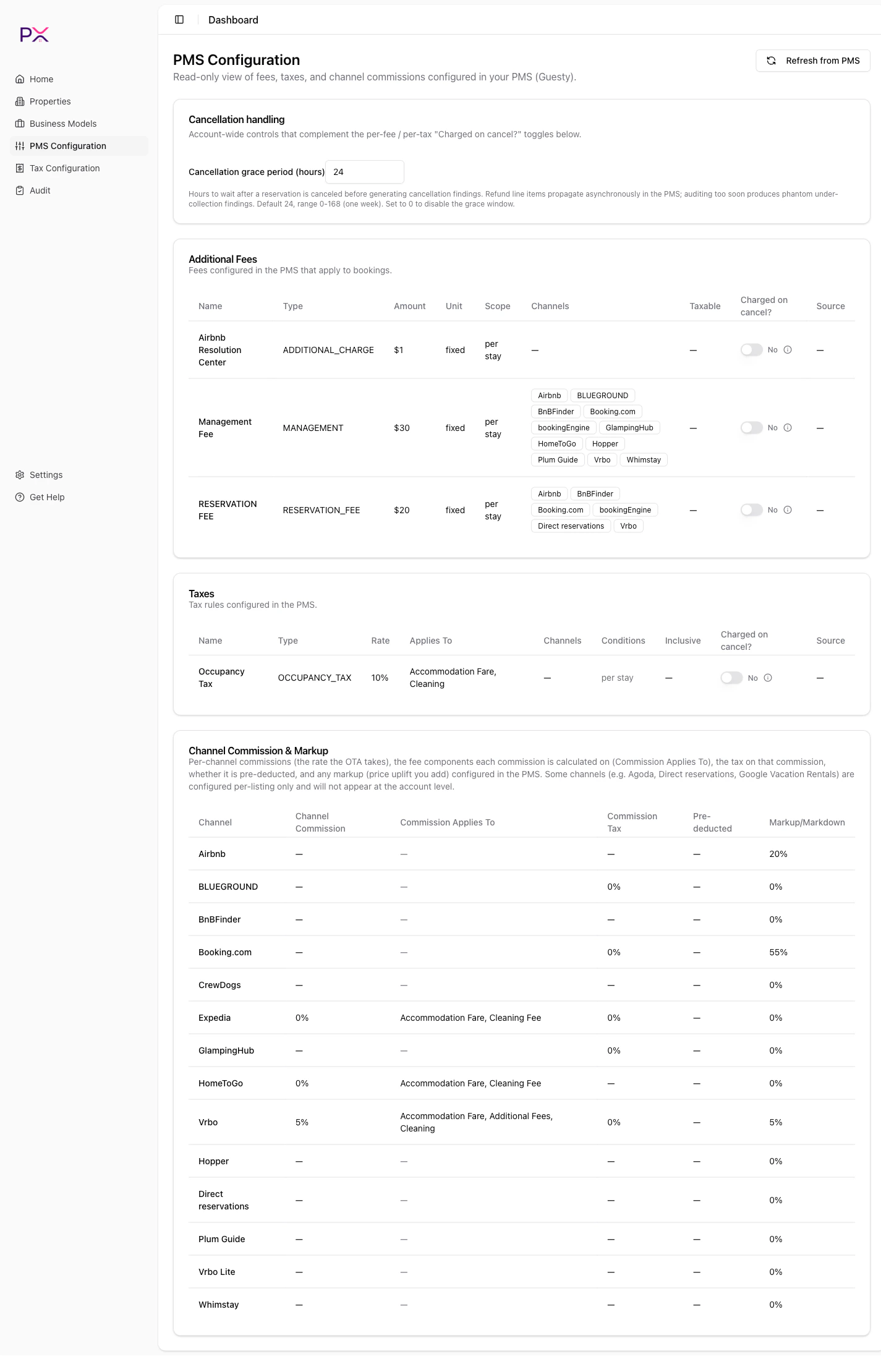
Guesty PMS configuration
Page structure
Three lazy-loaded sections, each rendering its own card:- Account Fees
- Account Taxes
- Channel Commissions
Account Fees
Fees configured at the account level in Guesty - cleaning fee, pet fee, extra guest fee, and any custom fees you have added. Each fee row shows:- Name - the fee label.
- Default amount - account-level default. Listings can override.
- Charge type -
flat,per night,per guest above N, or custom. - Applies to - which booking types or channels.
Account Taxes
Tax rules at the account level. Each row shows:- Name - the tax label.
- Percent - the rate.
- Applies to - fee categories the tax applies to (
ACCOMMODATION_FARE,CLEANING_FEE, etc.). - Applies to channels - OTA channels.
- Is inclusive - whether the tax is priced into accommodation or added on top.
- Stay-length filter - if applicable.
Channel Commissions
Per-channel commission rules from your Guesty channel configuration. Each row shows:- Channel - the channel name (Airbnb, Booking.com, Vrbo, etc.).
- Commission % - the rate Guesty deducts.
- Commission basis - what the commission is calculated on.
- Effective dates - if Guesty has time-bound rates.
COMMISSION_MISMATCH.
Per-listing config
The page above shows account-level config. Listings may have listing-level overrides - those are visible from the Property detail -> PMS Config tab. The per-listing view has the same three sections (Account Fees, Account Taxes, Channel Commissions) but scoped to the specific listing.Refreshing
Click Refresh from PMS at the top of the page to re-fetch all three sections from Guesty. PX:- Pulls fresh data via the Guesty admin API.
- Updates its mirror in place.
- Surfaces any errors in a banner at the top.
Errors and rate limits
Guesty has API rate limits. If you refresh too frequently, you may see a 429 response. PX backs off automatically and retries; meanwhile the page shows the cached version. If a refresh fails for another reason (expired credentials, deleted listing, etc.), the section header shows a red banner with the cause. Most issues resolve by reconnecting the PMS under Settings.Why this page exists
PX shows you the same configuration Guesty has so you can answer the question “did the PMS apply this rule on this booking?” without bouncing between Guesty and PX. When an audit reportsCOMMISSION_MISMATCH, you can open this page and see whether the channel commission setting changed mid-period - a common cause.