> ## Documentation Index
> Fetch the complete documentation index at: https://docs.pxaccounting.com/llms.txt
> Use this file to discover all available pages before exploring further.
# Per-listing taxes
> How listing-level overrides work and how to find them quickly.
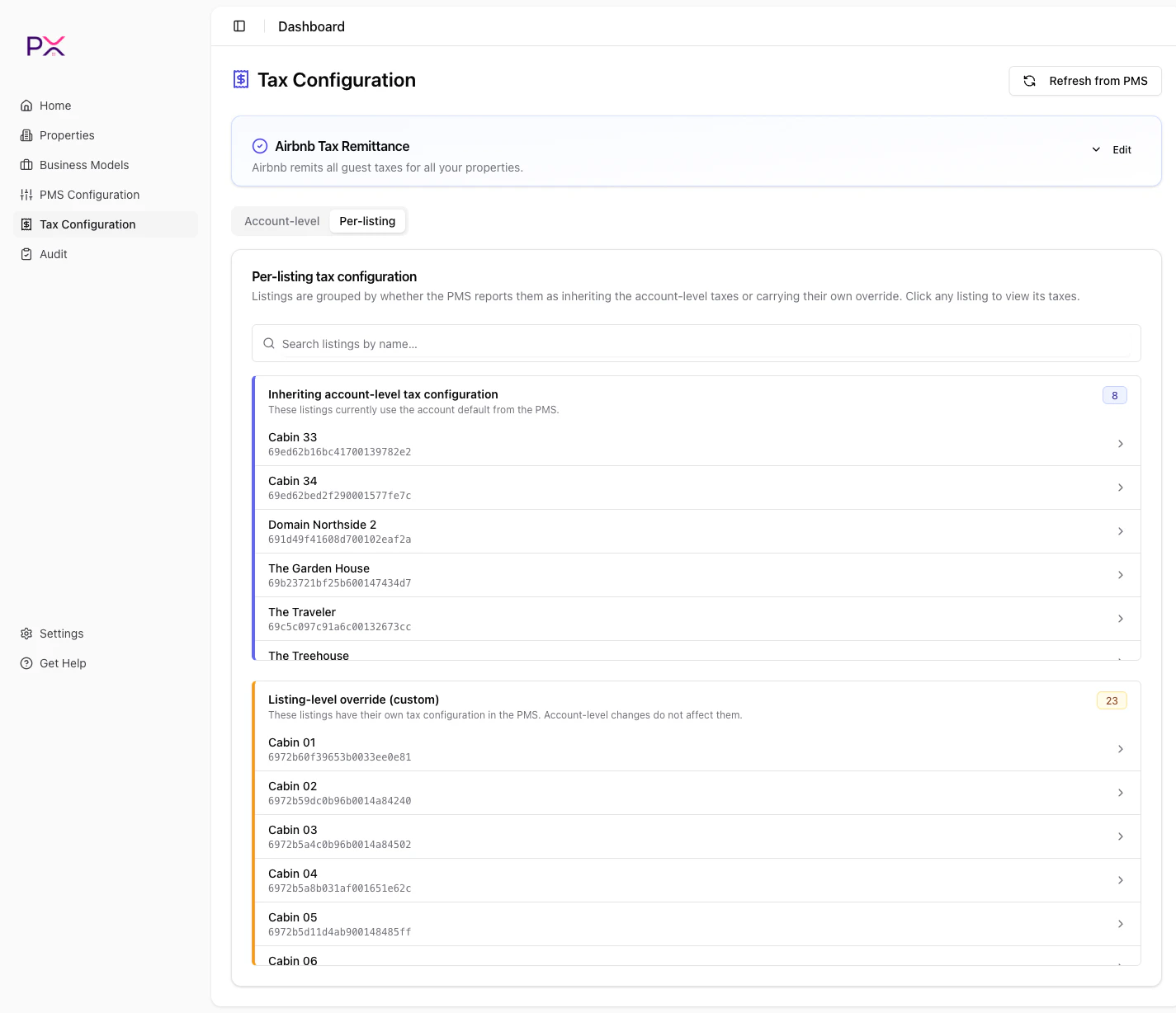
The **Per-listing** tab on the Tax Configuration page shows your listings grouped by how they relate to the account-level tax configuration.
## Group view
When you open the tab, listings are grouped into sections. Click any listing to drill in.
### Guesty groups
* **Inheriting account-level tax configuration** - the listing uses the taxes you see on the Account-level tab. No special handling.
* **Listing-level override (custom)** - the listing has a tax setup that differs from the account default. Most common when a property is in a different tax jurisdiction.
* **Unknown inheritance state** - PX could not determine inheritance from the PMS response. Usually rare and resolves on the next refresh.
### OwnerRez groups
* **Properties with confirmed taxes** - the OwnerRez catalog has confirmed tax entries scoped to (or applicable to) this listing.
* **Properties without configured taxes** - no confirmed catalog entries match this listing. Audits on these listings will likely return `CATALOG_EMPTY` or skip tax checks.
A search box at the top filters the listing list by name in real time.
 ## Drill-down view
Click a listing to open its detail. The detail page shows:
* A **Back** button to return to the group view.
* The listing name as title.
* Help text: *"Read-only tax configuration reported by the PMS for this listing."*
* A banner indicating inheritance state:
* **Blue** for listings inheriting from account level: *"This listing currently inherits its taxes from the account level."*
* **Amber** for listings with overrides: *"This listing has a listing-level override in the PMS."*
* The taxes that apply, with channel override chips next to each tax (editable).
### OwnerRez per-listing
For OwnerRez, the listing detail renders the **OwnerRez Catalog** scoped to entries that apply to this listing. You can confirm or edit catalog rows directly.
## Editing channel overrides per-listing
Each tax row has channel chips - these are PX's [channel sync overrides](/tax-configuration/channel-overrides). Click a chip to toggle whether the tax syncs to that channel for this listing.
Saving is automatic - PX persists the change as soon as you toggle. There is no Save button.
## When a listing has a custom tax
If a listing has a listing-level override in your PMS, the override takes precedence over the account default. PX shows the listing-specific taxes in the drill-down; the account taxes do not apply.
To make a listing follow the account default again, remove the override in your PMS, then click **Refresh from PMS** in PX.
## What about listings I added manually?
Manually-added properties in PX do not have PMS-side tax configuration. They appear under "Properties without configured taxes" on OwnerRez. Audits skip tax checks for manual properties.
## Drill-down view
Click a listing to open its detail. The detail page shows:
* A **Back** button to return to the group view.
* The listing name as title.
* Help text: *"Read-only tax configuration reported by the PMS for this listing."*
* A banner indicating inheritance state:
* **Blue** for listings inheriting from account level: *"This listing currently inherits its taxes from the account level."*
* **Amber** for listings with overrides: *"This listing has a listing-level override in the PMS."*
* The taxes that apply, with channel override chips next to each tax (editable).
### OwnerRez per-listing
For OwnerRez, the listing detail renders the **OwnerRez Catalog** scoped to entries that apply to this listing. You can confirm or edit catalog rows directly.
## Editing channel overrides per-listing
Each tax row has channel chips - these are PX's [channel sync overrides](/tax-configuration/channel-overrides). Click a chip to toggle whether the tax syncs to that channel for this listing.
Saving is automatic - PX persists the change as soon as you toggle. There is no Save button.
## When a listing has a custom tax
If a listing has a listing-level override in your PMS, the override takes precedence over the account default. PX shows the listing-specific taxes in the drill-down; the account taxes do not apply.
To make a listing follow the account default again, remove the override in your PMS, then click **Refresh from PMS** in PX.
## What about listings I added manually?
Manually-added properties in PX do not have PMS-side tax configuration. They appear under "Properties without configured taxes" on OwnerRez. Audits skip tax checks for manual properties.