> ## Documentation Index
> Fetch the complete documentation index at: https://docs.pxaccounting.com/llms.txt
> Use this file to discover all available pages before exploring further.
# Understanding findings
> How to read severity, expected vs actual, config source, and reasoning.
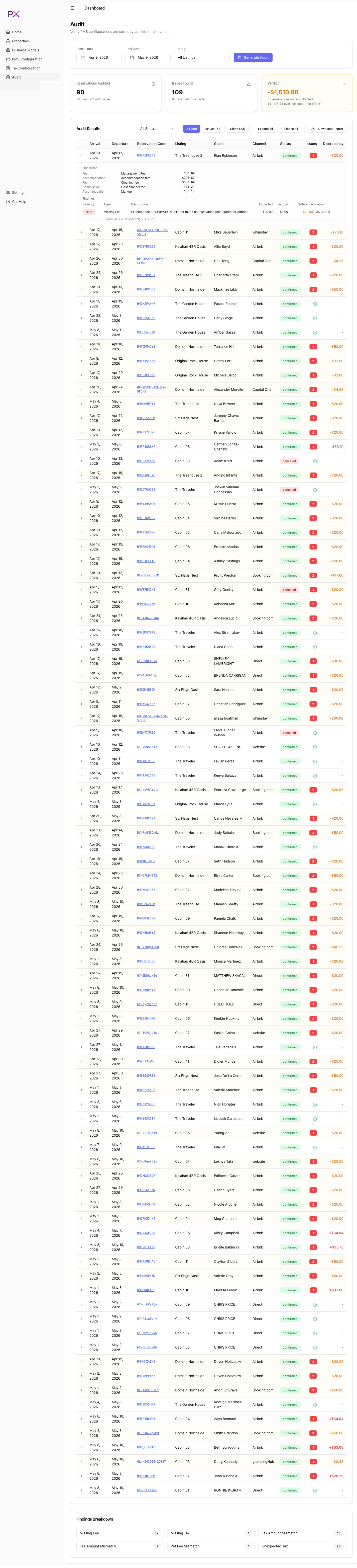
Every finding in an audit answers four questions:
1. **What went wrong?** - the finding name and short description.
2. **How serious is it?** - the severity.
3. **What was expected?** - PX's calculated value, with the source.
4. **Why did PX expect that?** - the reasoning string.
Once you internalize these four, you can triage findings quickly.
 ## Severity
Three levels:
* **Error** - a real discrepancy with a definite financial impact. Fix or dismiss before closing the period.
* **Warning** - something looks off but may have an explanation. Worth a human glance.
* **Info** - context for human review. Often confirms PX is suppressing a check on purpose (Airbnb-remitted tax, manual exception, and so on).
You can filter the audit results by severity from the Findings Breakdown grid above the table.
## Expected, actual, and difference
Each finding shows:
* **Expected amount** - the value PX calculated.
* **Actual amount** - the value recorded on the booking.
* **Difference** - signed (positive when under-collected, negative when over-collected).
The summary at the top of the audit aggregates these into the **Verdict** - the net direction across the run.
## Config source
A short label identifying which configuration drove the expectation. Examples:
* The tax came from your PMS's account-level taxes.
* The tax came from a listing-level override.
* A user channel sync override decided whether the tax applies.
* The Airbnb tax remittance setting suppressed or required a tax.
* The business model drove the expectation.
The config source tells you exactly where to look if you want to change the expectation. The in-app finding card shows the precise source for every finding.
## Reasoning
A short string explaining how PX arrived at the expected amount. Example:
```
expected = 0.085 * (accommodation_fare + cleaning_fee)
= 0.085 * (1200.00 + 150.00)
= 0.085 * 1350.00
= 114.75
```
When the reasoning is shown inline, the formula uses real values from the booking. This is usually enough to understand whether the issue is in the booking or the configuration.
## How to triage a finding
1. Read the **reasoning** string - it tells you the formula.
2. Check the **config source** - that points to where the expectation came from.
3. Decide:
* If the configuration is wrong, edit it. The next audit clears the finding.
* If the booking is wrong, fix it in the PMS. The next audit re-checks.
* If the booking is a one-off legitimate exception, **dismiss** the finding from the property detail page.
Most findings fall into one of these three buckets. Findings that cannot be triaged in a few minutes usually point to a deeper configuration issue worth investigating.
## False positives
False positives happen most often when:
* The PMS catalog is incomplete (most common when the catalog has not yet been confirmed in PMS Configuration).
* Channel sync overrides are missing for a channel that does not actually carry the tax.
* Airbnb tax remittance is not configured.
* A business model has a typo in commission percent or recurring charge category.
In all these cases, fixing the configuration is the right answer. Dismissing the finding only hides the symptom.
## Severity
Three levels:
* **Error** - a real discrepancy with a definite financial impact. Fix or dismiss before closing the period.
* **Warning** - something looks off but may have an explanation. Worth a human glance.
* **Info** - context for human review. Often confirms PX is suppressing a check on purpose (Airbnb-remitted tax, manual exception, and so on).
You can filter the audit results by severity from the Findings Breakdown grid above the table.
## Expected, actual, and difference
Each finding shows:
* **Expected amount** - the value PX calculated.
* **Actual amount** - the value recorded on the booking.
* **Difference** - signed (positive when under-collected, negative when over-collected).
The summary at the top of the audit aggregates these into the **Verdict** - the net direction across the run.
## Config source
A short label identifying which configuration drove the expectation. Examples:
* The tax came from your PMS's account-level taxes.
* The tax came from a listing-level override.
* A user channel sync override decided whether the tax applies.
* The Airbnb tax remittance setting suppressed or required a tax.
* The business model drove the expectation.
The config source tells you exactly where to look if you want to change the expectation. The in-app finding card shows the precise source for every finding.
## Reasoning
A short string explaining how PX arrived at the expected amount. Example:
```
expected = 0.085 * (accommodation_fare + cleaning_fee)
= 0.085 * (1200.00 + 150.00)
= 0.085 * 1350.00
= 114.75
```
When the reasoning is shown inline, the formula uses real values from the booking. This is usually enough to understand whether the issue is in the booking or the configuration.
## How to triage a finding
1. Read the **reasoning** string - it tells you the formula.
2. Check the **config source** - that points to where the expectation came from.
3. Decide:
* If the configuration is wrong, edit it. The next audit clears the finding.
* If the booking is wrong, fix it in the PMS. The next audit re-checks.
* If the booking is a one-off legitimate exception, **dismiss** the finding from the property detail page.
Most findings fall into one of these three buckets. Findings that cannot be triaged in a few minutes usually point to a deeper configuration issue worth investigating.
## False positives
False positives happen most often when:
* The PMS catalog is incomplete (most common when the catalog has not yet been confirmed in PMS Configuration).
* Channel sync overrides are missing for a channel that does not actually carry the tax.
* Airbnb tax remittance is not configured.
* A business model has a typo in commission percent or recurring charge category.
In all these cases, fixing the configuration is the right answer. Dismissing the finding only hides the symptom.