> ## Documentation Index
> Fetch the complete documentation index at: https://docs.pxaccounting.com/llms.txt
> Use this file to discover all available pages before exploring further.
# Export an audit as PDF
> Generate a shareable PDF report from any audit.
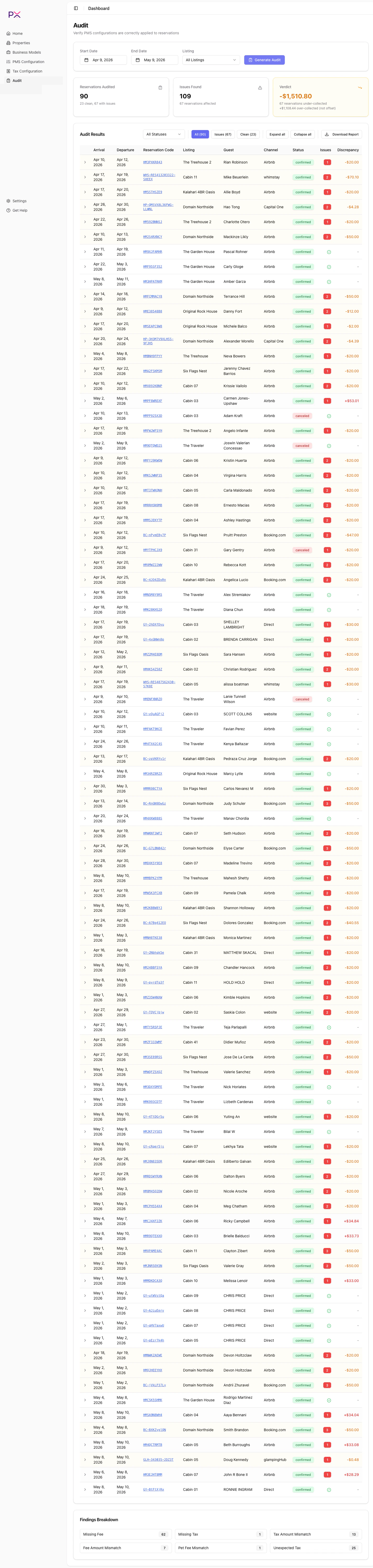
Every completed audit can be exported as a PDF. The button is at the top of the results table.
 ## Generating
1. Run an audit (see [Run an audit](/audit/run-an-audit)).
2. Once results load, click **Download Report**.
3. PX builds the PDF in the browser and downloads it.
The PDF includes:
* **Cover page** - audit ID, date range, listing filter, generated-at timestamp, your account name.
* **Summary** - reservations audited, issues found, verdict, total under-collected, total over-collected.
* **Findings breakdown** - count by finding type.
* **Per-reservation results** - one row per reservation, with line items and findings underneath.
* **Configuration snapshot** - relevant tax configuration, business model, and (if Airbnb) remittance settings at the time of the audit. This is useful for reproducibility - reviewers can see what rules drove the findings.
## Sharing
Three common patterns:
* **Email to an owner** with their property's findings, after running an audit with the listing filter set to that property.
* **Attach to an accountant email** as part of period close.
* **File internally** with the period's accounting documents for trust-account compliance.
There is no per-recipient access control on the PDF - anyone you send it to can read it. Use account-level access controls in your email platform if confidentiality matters.
## What is included from configuration
The PDF embeds a configuration snapshot taken at audit time. This is sourced from:
* **Tax Configuration** - account-level taxes and the Airbnb remittance settings.
* **Business Model** - the model assigned to each property at the audit's date range.
* **PMS settings** - the active PMS and integration status (provider, account, last refresh).
This snapshot reflects the configuration *at the time of audit generation*, not at the time of viewing. Re-running an audit with updated configuration produces a fresh PDF.
## File naming
PX auto-names the file as:
```
px-audit----.pdf
```
For example: `px-audit-2026-04-01-2026-04-30-all-20260504.pdf`.
Rename it however you like after download.
## Limitations
* PDFs are generated in the browser. Very large audits (5,000+ reservations) may take 30-60 seconds to render and may stutter on older machines. If you need a smaller file, run audits with a tighter listing filter.
* Images and brand customization are not yet supported - PDFs use the default PX style.
* Custom watermarks (DRAFT, FINAL) are not yet a feature. Add them with a PDF tool after download if needed.
## Generating
1. Run an audit (see [Run an audit](/audit/run-an-audit)).
2. Once results load, click **Download Report**.
3. PX builds the PDF in the browser and downloads it.
The PDF includes:
* **Cover page** - audit ID, date range, listing filter, generated-at timestamp, your account name.
* **Summary** - reservations audited, issues found, verdict, total under-collected, total over-collected.
* **Findings breakdown** - count by finding type.
* **Per-reservation results** - one row per reservation, with line items and findings underneath.
* **Configuration snapshot** - relevant tax configuration, business model, and (if Airbnb) remittance settings at the time of the audit. This is useful for reproducibility - reviewers can see what rules drove the findings.
## Sharing
Three common patterns:
* **Email to an owner** with their property's findings, after running an audit with the listing filter set to that property.
* **Attach to an accountant email** as part of period close.
* **File internally** with the period's accounting documents for trust-account compliance.
There is no per-recipient access control on the PDF - anyone you send it to can read it. Use account-level access controls in your email platform if confidentiality matters.
## What is included from configuration
The PDF embeds a configuration snapshot taken at audit time. This is sourced from:
* **Tax Configuration** - account-level taxes and the Airbnb remittance settings.
* **Business Model** - the model assigned to each property at the audit's date range.
* **PMS settings** - the active PMS and integration status (provider, account, last refresh).
This snapshot reflects the configuration *at the time of audit generation*, not at the time of viewing. Re-running an audit with updated configuration produces a fresh PDF.
## File naming
PX auto-names the file as:
```
px-audit----.pdf
```
For example: `px-audit-2026-04-01-2026-04-30-all-20260504.pdf`.
Rename it however you like after download.
## Limitations
* PDFs are generated in the browser. Very large audits (5,000+ reservations) may take 30-60 seconds to render and may stutter on older machines. If you need a smaller file, run audits with a tighter listing filter.
* Images and brand customization are not yet supported - PDFs use the default PX style.
* Custom watermarks (DRAFT, FINAL) are not yet a feature. Add them with a PDF tool after download if needed.