> ## Documentation Index
> Fetch the complete documentation index at: https://docs.pxaccounting.com/llms.txt
> Use this file to discover all available pages before exploring further.
# Account settings
> PMS connection, integration status, account preferences, and danger zone.
The **Settings** page is the home for everything that affects your account globally - connecting a PMS, watching integration health, setting your timezone, managing billing, and (when needed) deleting the account.
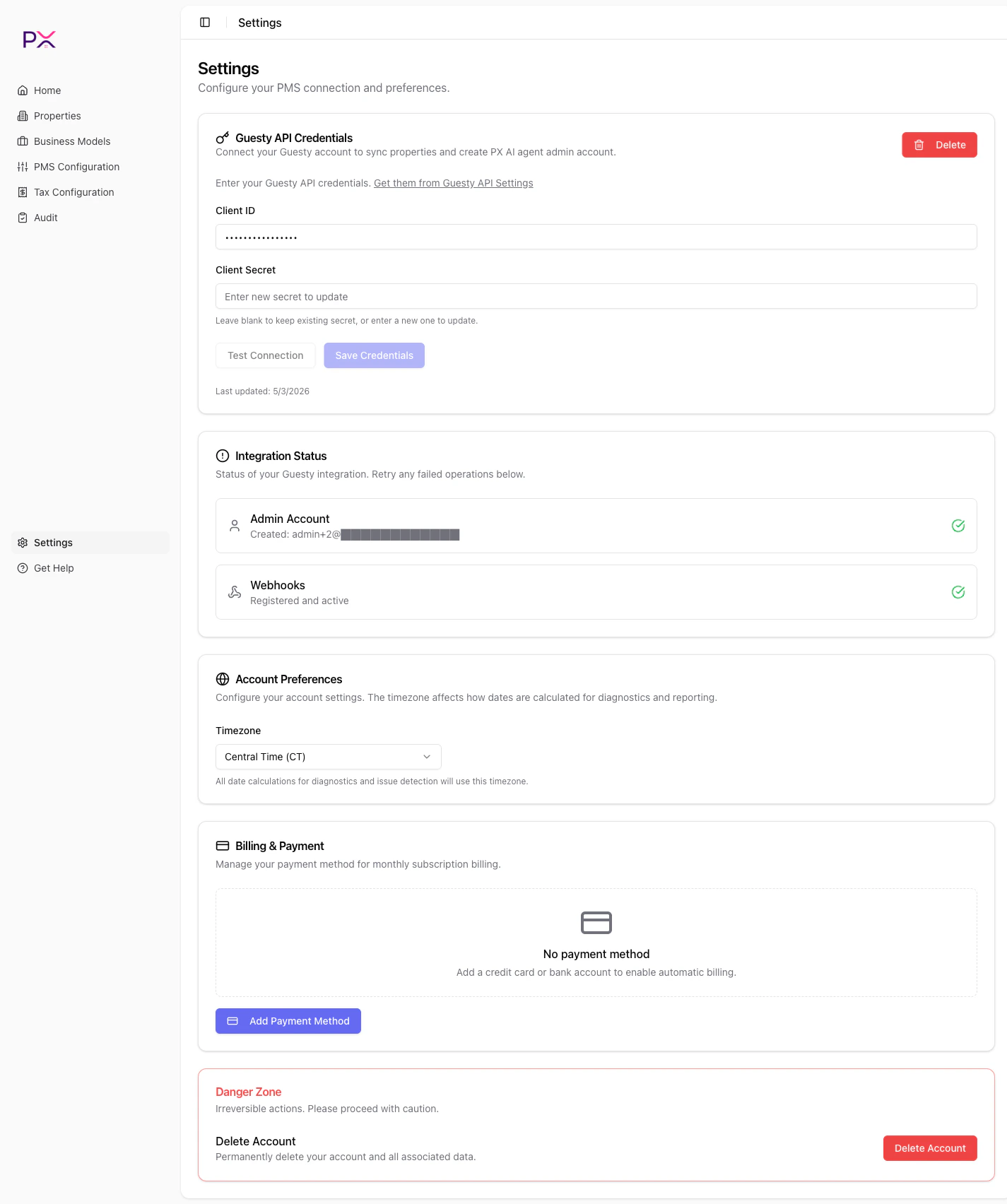 The page is organized into cards:
1. **PMS Connection**
2. **Integration Status**
3. **Account Preferences**
4. **Billing & Subscription**
5. **Danger Zone**
## PMS Connection
Connect, swap, or disconnect a PMS. Pick a provider:
* **Guesty** - paste a Client ID and Client Secret. See [Connect Guesty](/integrations/connect-guesty).
* **OwnerRez** - click **Connect with OwnerRez** to start OAuth. See [Connect OwnerRez](/integrations/connect-ownerrez).
Once connected, the card shows the active provider and offers a **Delete** button to remove the credentials.
You can only have **one** active PMS at a time. Switching providers requires deleting the existing credentials first.
## Integration Status
Three lights, one for each subsystem:
* **Admin** - PX can authenticate against the PMS admin API.
* **OAuth** - the access token is valid and stored encrypted.
* **Webhook** - PX successfully registered its webhook endpoint with your PMS.
Each light is green when healthy and red with an error message when not. A **Refresh** button at the top of the panel re-runs the checks.
Common red-light causes:
* **Admin red** - wrong Client ID, deleted application, or insufficient scope.
* **OAuth red** - expired or revoked token. Reconnect via the PMS Connection card.
* **Webhook red** - PMS plan limits, invalid URL, or webhook quota exhausted.
Click each light to expand for the underlying error string.
## Account Preferences
Currently a single setting:
* **Timezone** - dropdown of US timezones (Pacific, Mountain, Central, Eastern, Alaska, Hawaii). Affects how dates display across PX.
See [Timezone](/account/timezone) for what the timezone setting affects (and what it does not).
## Billing & Subscription
Manage your payment method:
* **No payment method** - displays an **Add Payment Method** button that opens Stripe Checkout in a new tab.
* **Card on file** - displays the brand and last 4 (e.g., *Visa ending in 4242*) plus expiration. **Remove** button to delete.
* **Bank account on file** - displays the bank name and last 4. **Remove** button to delete.
See [Billing](/account/billing) for the full billing workflow.
## Danger Zone
A single button: **Delete Account**.
Clicking it opens a confirmation dialog with a 2FA-style verification step. Deleting:
* Removes your PMS credentials.
* Removes business models, tax configuration, and audit history.
* Cancels billing.
* Logs you out.
Irreversible. See [Delete account](/account/delete-account).
## Layout notes
The Settings page is the **first stop** for new users. PX redirects new sign-ins here when no PMS is configured because nothing else works without a PMS connection.
Existing users typically only return to Settings to:
* Refresh integration status after a PMS-side change.
* Update timezone after moving offices.
* Replace a payment method.
* Disconnect when offboarding.
The page is organized into cards:
1. **PMS Connection**
2. **Integration Status**
3. **Account Preferences**
4. **Billing & Subscription**
5. **Danger Zone**
## PMS Connection
Connect, swap, or disconnect a PMS. Pick a provider:
* **Guesty** - paste a Client ID and Client Secret. See [Connect Guesty](/integrations/connect-guesty).
* **OwnerRez** - click **Connect with OwnerRez** to start OAuth. See [Connect OwnerRez](/integrations/connect-ownerrez).
Once connected, the card shows the active provider and offers a **Delete** button to remove the credentials.
You can only have **one** active PMS at a time. Switching providers requires deleting the existing credentials first.
## Integration Status
Three lights, one for each subsystem:
* **Admin** - PX can authenticate against the PMS admin API.
* **OAuth** - the access token is valid and stored encrypted.
* **Webhook** - PX successfully registered its webhook endpoint with your PMS.
Each light is green when healthy and red with an error message when not. A **Refresh** button at the top of the panel re-runs the checks.
Common red-light causes:
* **Admin red** - wrong Client ID, deleted application, or insufficient scope.
* **OAuth red** - expired or revoked token. Reconnect via the PMS Connection card.
* **Webhook red** - PMS plan limits, invalid URL, or webhook quota exhausted.
Click each light to expand for the underlying error string.
## Account Preferences
Currently a single setting:
* **Timezone** - dropdown of US timezones (Pacific, Mountain, Central, Eastern, Alaska, Hawaii). Affects how dates display across PX.
See [Timezone](/account/timezone) for what the timezone setting affects (and what it does not).
## Billing & Subscription
Manage your payment method:
* **No payment method** - displays an **Add Payment Method** button that opens Stripe Checkout in a new tab.
* **Card on file** - displays the brand and last 4 (e.g., *Visa ending in 4242*) plus expiration. **Remove** button to delete.
* **Bank account on file** - displays the bank name and last 4. **Remove** button to delete.
See [Billing](/account/billing) for the full billing workflow.
## Danger Zone
A single button: **Delete Account**.
Clicking it opens a confirmation dialog with a 2FA-style verification step. Deleting:
* Removes your PMS credentials.
* Removes business models, tax configuration, and audit history.
* Cancels billing.
* Logs you out.
Irreversible. See [Delete account](/account/delete-account).
## Layout notes
The Settings page is the **first stop** for new users. PX redirects new sign-ins here when no PMS is configured because nothing else works without a PMS connection.
Existing users typically only return to Settings to:
* Refresh integration status after a PMS-side change.
* Update timezone after moving offices.
* Replace a payment method.
* Disconnect when offboarding.